


Realtor.com Real Estate & Rent
4.782.65K Reviews
App Specs
- Version
- 27.6.0
- Updated On
- License
- Free
- Downloads
- 10,000,000+
- Developer
- realtor.com®
- Categories
- House & Home
- Platform
- Android, iOS
Screenshots
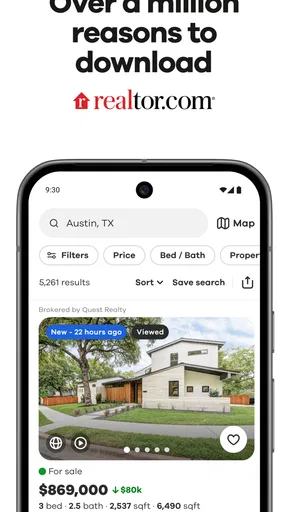
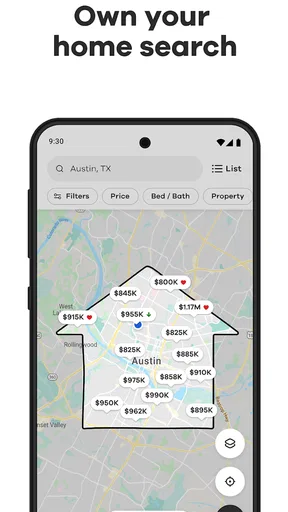
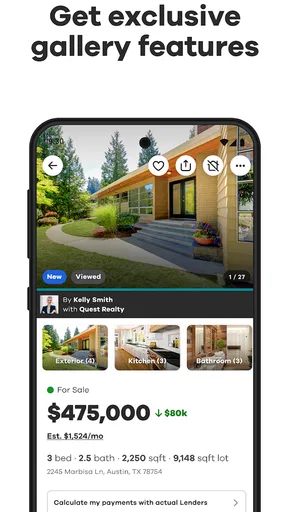

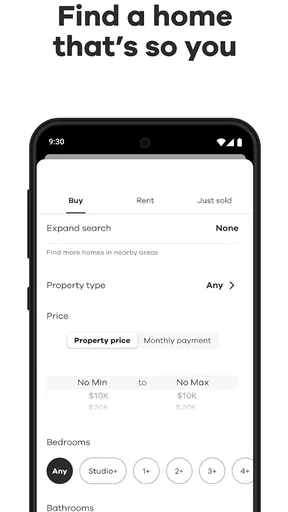
 Analysis by AppCompare
When two people are searching for a place to live, the search can quickly become a jumble of screenshots, shared links, and different ideas of what “close to work” means. I find a home-search app most useful when it gives everyone a common starting point: the same listing details, map, and criteria to discuss. Realtor.com Real Estate & Rent is built around that kind of browsing, with homes for sale and apartments for rent gathered in one place. It is a free House & Home app from realtor.com®, and its focus is practical: help me look across neighborhoods, narrow the possibilities, and decide which properties deserve a closer look.
One search, several household priorities
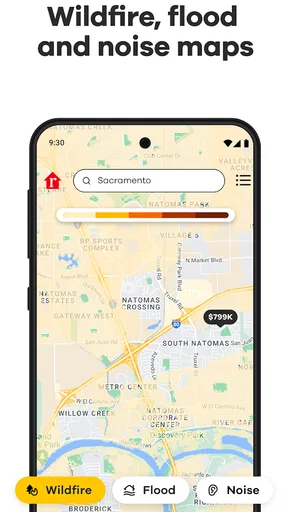
A realistic use is a couple or housemates looking for a rental after work. One person might care most about commute and neighborhood; another may be focused on bedrooms, price, or whether a particular home feels workable day to day. Rather than treating the first attractive listing as the answer, I’d use the map to get a feel for where options cluster, then apply filters to make the search more manageable. That shared process is more useful than sending each other a stream of loosely related listings.
The app can also suit someone who is only beginning to explore a move. Browsing both sale and rental options makes it easier to see what is available in areas of interest before committing to a narrow plan. Still, I would treat the results as a research tool, not a household decision-maker: a map and a set of filters can clarify preferences, but they cannot settle questions such as how much travel time each person is comfortable with or which compromises matter least.
Keep accounts and expectations clear
For shared-device use, I’d make a simple boundary before handing the phone around: decide whose account is being used, and avoid assuming that one person’s saved searches or alerts automatically represent everybody’s preferences. I would not share sign-in details casually. If each household member wants a separate view of the search, they can keep their own browsing and compare the specific properties they like together. That keeps personal account activity distinct from the group conversation.
This distinction matters when a search includes sensitive practical details. A listing can prompt discussion about budgets, location, or moving plans, so I’d share only what the other person needs to evaluate the property. The app is useful for comparing homes, but the household still needs its own way to agree on priorities and keep track of decisions. A short shared note with the agreed price range, must-haves, and deal-breakers can prevent repeated debates when several listings look similar.
Coordinate without letting alerts set the pace
Alerts can help keep a search current, especially when a new listing or price change deserves a timely look. In a shared household, though, a notification is a prompt to review an option, not an instruction to act immediately. I’d agree in advance who checks new matches and how they will flag a promising property for everyone else. That makes it less likely that one person feels pressured by an alert while another has not even seen the listing.
A useful routine is to set aside a regular time to compare candidates rather than reacting to every notification as it arrives. For each property, I’d check the details, look at where it sits on the map, and write down one concrete reason it might work and one question that needs an answer. This turns browsing into a shortlist instead of an endless scroll. It also helps separate an appealing photo from a place that actually fits the household’s daily needs.
Worth Reading Before You Choose

Flipboard Shows What News Apps Must Do Beyond the Feed

Switching to Android Auto Means Rethinking Your Driving Routine

Google Calendar Makes a Crowded Week Easier to Manage

Ludo King Makes the Most of the Minutes Between Plans

Baby Panda World Brings Quick Play to Modern Phones, but Its Game Library Feels Busy

ESPN’s Live Game View Makes Following Close Games Easier
The app is rated for Everyone, but that does not mean every home-search conversation is automatically suited to every child. Young family members can enjoy looking at rooms or imagining a new home, while adults should handle account access, money discussions, and decisions about contacting people or arranging visits. I see no reason to treat the app as a family-control tool; it is better approached as a property-search resource that adults can use and explain in an age-appropriate way.
Realtor.com has an average rating of 4.7 from around 540,000 ratings, and it has been installed over 10 million times. Those figures suggest that it is a familiar option for many people, but they do not guarantee that every local search will feel equally complete or that every listing will suit a particular household. It is free, which makes it easy to try as a first stop, and its current version is 26.12.46 for devices running Android 8.0 or later. I would still verify important property details directly before making a financial or moving decision.
The Ultimate House-Hunting Companion
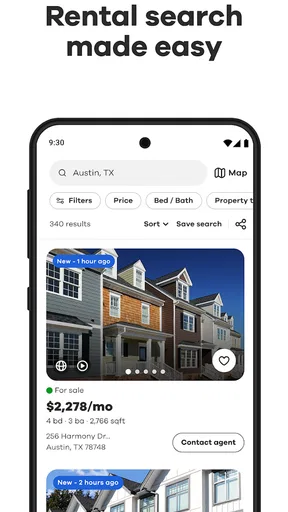
Browsing for homes has never been this easy, folks. The user interface on Realtor.com Real Estate & Rent is slick and intuitive. You can dive right into the map view, zoom in on neighborhoods you’re interested in, and voilà! You’ll see all the available listings. It’s like having a bird’s eye view of the real estate market.
One of my favorite features has to be the detailed filters. You can customize your search based on price, number of bedrooms, type of property, and so much more. It’s like having a personal assistant who knows exactly what you’re looking for. And, oh, the joy of discovering homes you didn’t even know existed!
Stay Updated with Real-Time Alerts
If you’re serious about house hunting, you’ll appreciate the real-time alerts. The app sends you notifications whenever there’s a price drop or a new listing that matches your criteria. It’s perfect for staying ahead of the competition—because let’s face it, in today’s market, timing is everything.
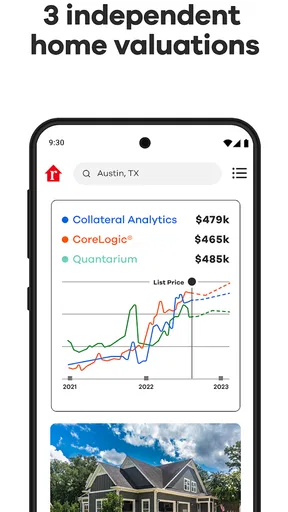
Plus, the app gives you all the nitty-gritty details you need about each property, including tax history, school info, and even the neighborhood vibe. It’s like doing a deep dive into the property without having to leave your couch. Talk about convenience!
Virtual Tours: A Sneak Peek into Your Future Home
Now, here’s where things get exciting. The app offers virtual tours for many properties, allowing you to walk through the home without ever stepping foot inside. It’s perfect for those of us who want to explore every nook and cranny before making any decisions. Plus, it’s a great way to daydream about future possibilities.
But what really sets this app apart is its community insights. Want to know what it’s like to live in a particular area? The app provides user reviews and ratings of neighborhoods, giving you a glimpse into what your life could be like there. It’s like having a chat with a local without even having to visit.
How I’d use the details in a real search
Property pages are most helpful when I treat them as a starting point for questions, not as a substitute for checking a home in person. Tax history, school information, and neighborhood impressions can add context, but each answers a different question. I’d use tax history as a prompt to ask what costs may apply to the property, school information as one part of a household’s location research, and neighborhood comments as perspectives to weigh rather than a definitive verdict.
Virtual tours are especially handy for narrowing a shortlist when visiting every candidate is inconvenient. I’d use one to check the flow between rooms, notice whether the layout seems suitable, and identify details I want to inspect during an in-person visit. A tour cannot tell me how a space feels at different times of day or resolve every concern about condition, noise, or the surrounding area. It can, however, help me avoid spending time on a place whose layout is clearly a poor fit.
Where it stands beside other search methods
Compared with checking individual agency pages or relying on a general web search, a dedicated property app gives me a more focused way to browse, filter, and revisit options. The map is particularly useful when I know the general area I want but not the exact street or neighborhood. Filters are better for turning broad wishes into a manageable list, while neighborhood information can add context that a bare list of addresses lacks.
There is a trade-off: no single app should be the only source I use when a move becomes serious. Listings and online impressions are a convenient first pass, while direct conversations, in-person visits, and careful confirmation of terms are important before committing. If I already have a specific agent, property manager, or building in mind, contacting that source directly may answer practical questions faster than browsing more options. This app makes the most sense when I need breadth and a way to organize early research.
Who will get the most from it
I’d recommend trying it if you are comparing neighborhoods, planning a move, looking for a rental, or beginning to explore buying without yet knowing exactly what you want. It is also a useful shared reference for households that need to discuss several possibilities without relying entirely on memory. A first-time searcher can use filters to learn which trade-offs are available, while a more experienced mover can use the map and alerts to keep an eye on matching properties.
It may be less helpful if you already know the exact property you want and only need a direct answer from its owner or manager. It is also not a replacement for local expertise when your decision depends on details that need personal verification. Someone who finds repeated browsing stressful may prefer to define a shortlist with another household member first, then use the app only to check candidates against those agreed priorities. The tool works best when it supports a clear plan rather than encouraging endless comparison.
A practical way to avoid search fatigue
My tip is to begin with a small set of non-negotiables and keep preferences separate from requirements. For example, a household can agree that a certain price ceiling or location is essential while treating features such as an extra room as desirable but flexible. Then the filters can reduce the field without hiding the fact that every search involves compromises. If too many results appear, tighten one criterion at a time; changing several at once makes it harder to understand why a promising home disappeared.
I’d also avoid judging a neighborhood from a single review or a quick map glance. Use those tools to identify questions for a visit, then consider how the area fits each person’s real routine. If a property looks appealing online, save the decision for after the household has reviewed the details together and checked what matters in person. That small pause is a useful counterweight to the urgency that new-listing alerts can create.
Useful, with the right expectations
In conclusion, if you're in the market for a new home or just love perusing beautiful properties, the Realtor.com Real Estate & Rent app is a must-have. It's packed with features that make house hunting not just easier, but genuinely enjoyable. So go ahead, download it, and start your real estate adventure today!
My more measured recommendation is to use it as a strong starting point rather than the whole process. The map, filters, alerts, property details, tours, and neighborhood perspectives can help a household move from vague interest to a thoughtful shortlist. The limitations are worth keeping in mind: online information does not settle every practical question, and a notification cannot decide whether a home works for everyone who will live there. For a free app that supports both casual browsing and organized early research, I think it is an easy option to try; just pair its convenience with direct checking and a conversation about what your household actually needs.
Pros
- User-friendly interface enhances navigation.
- Comprehensive property listings updated frequently.
- Advanced search filters for specific needs.
- Detailed property info
- including school ratings.
- Mortgage calculator for financial planning.
Cons
- Occasional slow loading times.
- Some areas have limited listing coverage.
- Ads can be intrusive at times.
- Notifications can be overwhelming.
- Requires constant internet connection.
FAQs for Realtor.com Real Estate & Rent
What features does the Realtor.com Real Estate & Rent app offer?
The Realtor.com app provides a comprehensive set of features, including up-to-date home listings, rental properties, and open house schedules. Users can access detailed property information, high-quality photos, and virtual tours. The app also offers mortgage calculators, neighborhood insights, and the ability to connect with local real estate agents directly from the app.
Is the Realtor.com app free to use, and are there any in-app purchases?
Yes, the Realtor.com app is free to download and use. Most of its features, including browsing listings and contacting agents, are available at no cost. However, there may be optional premium features or services that could require in-app purchases, aimed at providing additional insights or personalized assistance.
How frequently are the property listings updated on the Realtor.com app?
Property listings on the Realtor.com app are updated frequently, often multiple times a day. The app is designed to pull data directly from MLS (Multiple Listing Services) to ensure users have access to the latest information on available properties, price changes, and new listings in real-time, enhancing the accuracy of the search experience.
Can I use the Realtor.com app to find rental properties?
Absolutely, the Realtor.com app is equipped to assist users in finding rental properties in addition to homes for sale. The app includes a dedicated section for rentals, where users can filter searches based on criteria such as price, location, and amenities, making it a versatile tool for both buyers and renters.
How does the Realtor.com app ensure privacy and data security?
Realtor.com takes privacy and data security seriously. The app employs encryption and other security measures to protect user data. Users can also review privacy settings and manage personal information through the app. Realtor.com complies with relevant data protection laws to safeguard user privacy effectively.


